Connect a domain you already own
Last updated
Point a domain you own at your site by adding DNS records where you bought it. We check on our own and the card shows where it stands.
- Who can do this
- Owners and admins
- Where to find it
- Website, then Domains
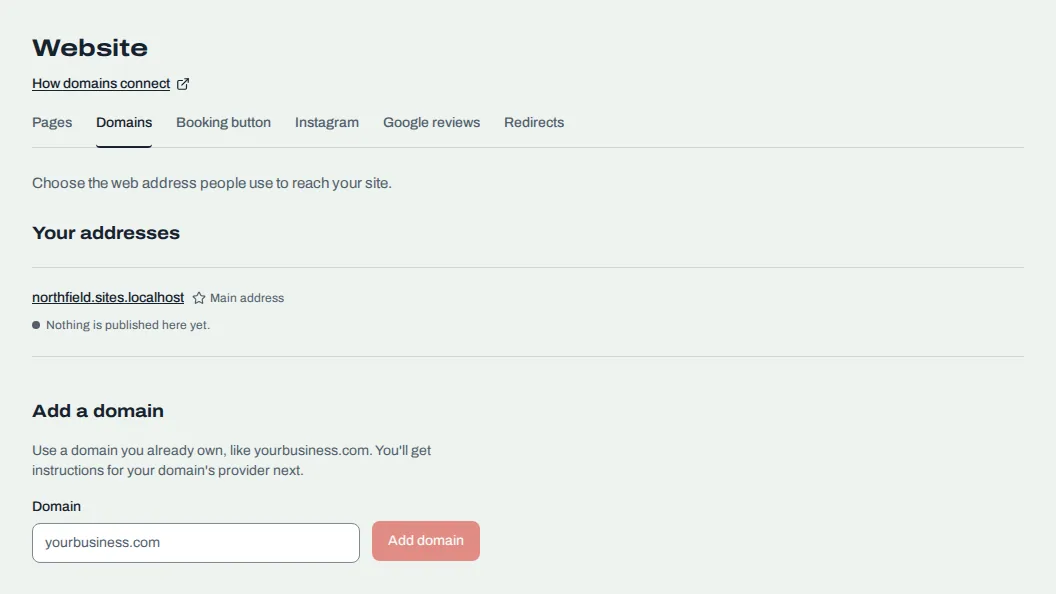
Your site already has an address on RedStick. Add a domain you own, like yourbusiness.com, to use that instead.
Add the domain
Open Website, then the Domains tab.
Under Add a domain, type your domain in Domain, like yourbusiness.com.
Leave the box checked to also connect the matching www address, so both reach your site. One ownership record covers both. Clear it to connect only the one you typed.
Choose Add domain.
Your plan allows a set number of domains. If you have reached it, remove one to add another. A trial can connect a domain like any other plan.
Add the records
The domain appears under Your addresses with a card that lists the DNS records to add. Sign in wherever you bought the domain, find its DNS settings, and add each record exactly as written. Choose Copy beside a value to copy it.
| Record | What it does |
|---|---|
| TXT, named _redstick | Proves the domain is yours. Keep it: we check it every day. |
| A | For a plain domain like yourbusiness.com. Sends it to your site. You may get a second one, so the site stays up. |
| CNAME | For a name that starts with www or another subdomain. Sends it to your site. |
Each record is marked Found or Not found yet as we check.
While we check
We check every minute at first, then less often. You can choose Check now to look again. The card's status tells you what is happening:
"Waiting on your DNS": add the records. If you've added some, the card says which are "Not found yet".
"Your DNS is set. We're getting a security certificate for this address."
"Live. This address goes to your site."
If it stays stuck, see Fix "Waiting on your DNS".
Make it the main address
Once a domain is live, choose Make main address on the one you want visitors to see first. The card shows "Main address".
Remove a domain
Choose Remove, then Remove domain, or Keep it to stop. Your site stays at its RedStick address. Anyone using the removed domain stops reaching your site. If you add it again later, you add its records again.
Related
Was this article helpful?
No
Still stuck? Contact us.